To reserve a table at Siena through Tripadvisor in 2026, open the correct Alpharetta listing and follow its reservation link if one appears; complete the booking only after checking the destination and details. Instead of searching through listings repeatedly, keep the Siena website as your direct starting point and save the confirmation from whichever reservation service it directs you to.
- To reserve a table at Siena through Tripadvisor, verify the Alpharetta listing before following any reservation link.
- Siena suits diners planning Mediterranean and Italian date-night dinners and celebrations in Downtown Alpharetta.
- A restaurant listing is not a reservation; finish the booking and retain its confirmation.
- Use the restaurant website when a third-party listing does not provide a clear booking path.
WHY THIS MATTERS
A date-night dinner should begin with anticipation, not uncertainty about whether you booked a table. A restaurant profile, a booking form and a confirmation are different stages. Treat the reservation as complete only when the booking service or restaurant explicitly confirms it.
For a 2026 dinner or celebration, use the restaurant’s current website to establish the booking route rather than relying on an old review, a screenshot or a search-result description. Those materials do not confirm the details of your own reservation.
Siena is a fit for diners seeking Mediterranean and Italian dining for date nights and celebrations in Downtown Alpharetta. Keep the planning equally focused: the right restaurant, the right occasion and a booking record you can find when you need it.
BEFORE YOU START
- Gather your dinner details. Have your intended date, preferred time, party size and contact information ready. Ask your guests about essential requirements before you submit anything.
- Keep access to your confirmation channel. Use an email address or phone you can check. If the booking destination asks you to sign in, complete that step there rather than assuming your Tripadvisor account carries over.
- Expect a possible handoff. A restaurant listing and the service handling reservations are not necessarily the same page. Before entering personal details, confirm that the destination still identifies the correct restaurant in Alpharetta.
For your 2026 plans, use the information displayed during the actual booking process. Do not carry forward opening hours, booking instructions or policies from an earlier visit without checking them again.
The non-obvious catch is the handoff: leaving Tripadvisor does not itself mean anything has gone wrong, but it also does not mean you have booked. You still need to review the destination, finish the required steps and keep the resulting confirmation.
RESTAURANT IDENTITY
Find the correct listing
- Search Tripadvisor using the restaurant name together with Alpharetta, Georgia. Keep the location in the search so you are not relying on the name alone.
- Open the restaurant profile rather than treating a search preview as the booking page. Read the identifying information on the profile itself.
- Compare the restaurant identity with Siena’s official website. Check the location and business details before following a reservation link or entering guest information.
- Look for a reservation action on the listing. If none appears, return to the official website and use the reservation link presented there.
Expected result: You have identified the intended restaurant and a clear next step toward booking. You have not yet made a reservation.
Do not use photographs or a familiar-looking name as your only identity check. Those are useful for browsing, but the restaurant name and location are the details that connect your dinner plans to the correct booking destination.
If the listing and official website appear inconsistent, stop the booking process. Resolve that discrepancy through the restaurant’s published contact route before sharing your contact information or making plans around a particular time.
BOOKING DESTINATION
Follow the reservation path
- Open the reservation action if the Tripadvisor listing displays one. Read the destination before proceeding.
- Check that the destination identifies the intended restaurant. A reservation service’s branding can differ from the restaurant’s branding; the restaurant identity still needs to match.
- Enter your intended date, time and party size using the fields actually displayed. Follow the live page’s instructions rather than searching for a button name from an older guide.
- Read any booking terms shown before continuing. Ask the restaurant about a requirement you do not understand rather than interpreting it from memory.
Expected result: Your booking details refer to the correct restaurant and the dinner you intend to arrange. You are ready to review the request before submitting it.
The table below separates the purpose of each route without assuming that Tripadvisor handles the reservation itself.
| Starting point | Best for | Useful feature | Limitation |
|---|---|---|---|
| Tripadvisor listing | Diners who discovered the restaurant while browsing | Keeps discovery and a possible booking link together | A profile alone does not establish a booking or its terms |
| Official restaurant website | Diners who want the restaurant’s own booking direction | Provides a first-party starting point | You still need to complete the linked reservation process |
| Restaurant contact route | Diners with arrangements that need discussion | Lets you ask about the details of your occasion | Sending a question is not the same as receiving a confirmed reservation |
Use the official website whenever the next step on a listing is unclear. Do not keep opening unrelated booking pages just because they mention the restaurant name.
GUEST DETAILS
Review before submitting
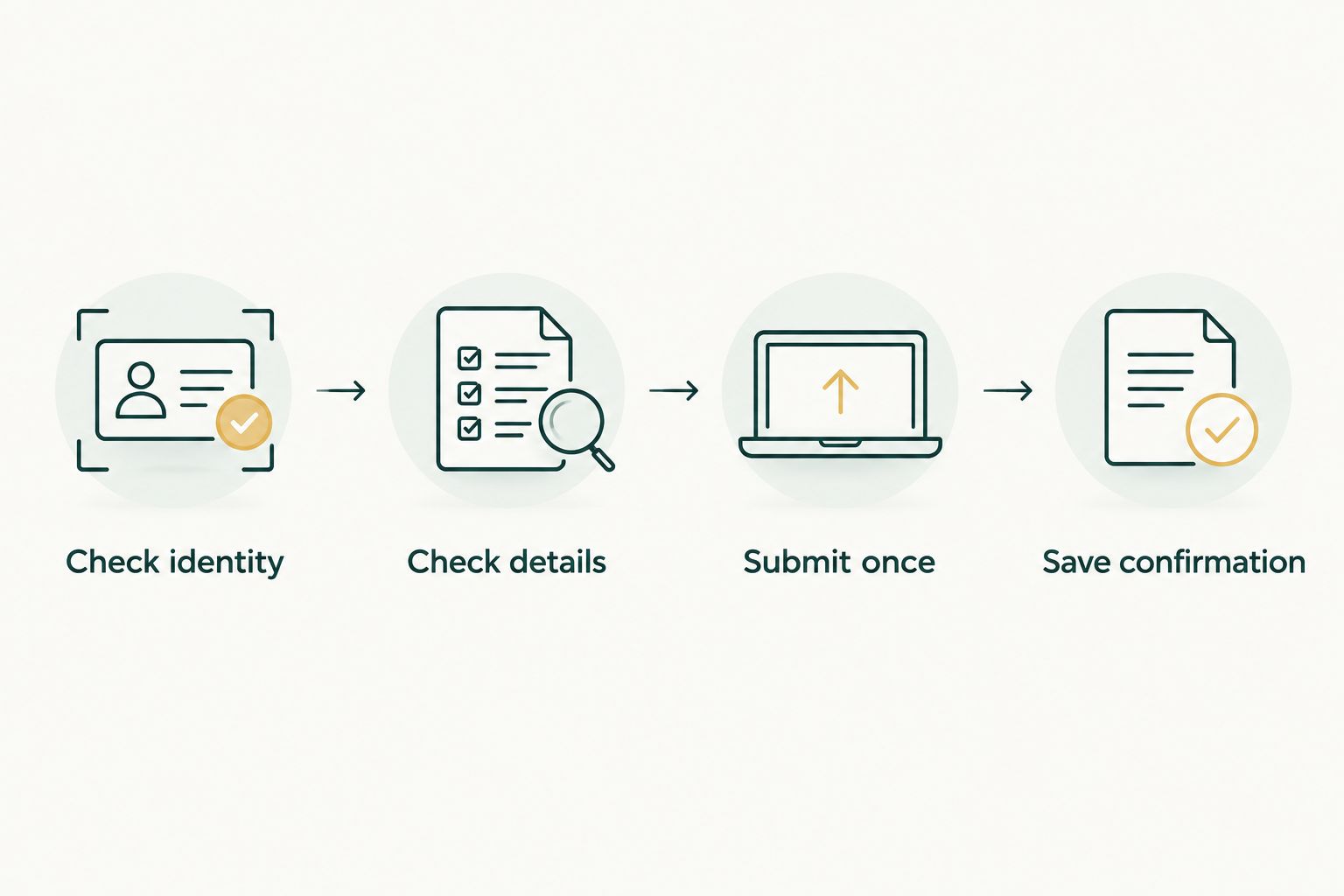
- Check identity. Confirm the restaurant and location on the booking summary.
- Check details. Review the date, time and party size together. Read the full date rather than checking only the day of the week.
- Submit once. Enter accurate contact information and complete the final action required by the booking page. Avoid submitting another request while you are still checking the first attempt.
- Save confirmation. Keep the confirmation screen or message, including any reference and instructions it provides.
Expected result: You have an explicit confirmation that matches your intended dinner, or you know that you still need to resolve the booking.
These 4 checks make a useful final pause before you tell your guests the evening is arranged. For 2026 bookings, read the final summary as the record of what you submitted—not the date you originally had in mind.
A note about an anniversary, birthday or seating preference is a request unless the restaurant explicitly accepts it. Keep the distinction clear when speaking with your guests. A confirmed table does not, by itself, confirm every additional arrangement you mentioned.
For an essential requirement, use the restaurant contact page to find the published way to ask. Explain what you need before treating the arrangement as settled.
CONFIRMATION RECORD
Keep the evening organized
- Read the confirmation from beginning to end. Check for instructions about changes, cancellation or contacting the booking provider.
- Save the record somewhere you can reach on the day of dinner. Keep any reference attached to the original message.
- Share the confirmed restaurant, date, time and party size with your guests. Separate confirmed details from requests still awaiting an answer.
- Assign 1 organizer to handle changes. Ask everyone else to send updates to that person rather than making separate bookings or inquiries.
Expected result: Your group has one clear dinner plan and one person responsible for keeping it accurate.
There is no need to circulate every planning message. Share the information guests need, while keeping the original booking record with the organizer. If something changes, update the booking through the route identified in that record.
Plan Your Siena Dinner
Start with the restaurant website and follow its reservation link for your date night or celebration.
WHEN YOUR DINNER PLANS CHANGE
Changing an existing booking is a different workflow from making a new one. Start with the original confirmation, not a fresh restaurant search.
- Open the booking confirmation and find its instructions for changes. Use the route it provides, if one is included.
- Identify what needs to change: the date, time, party size or an additional request. Keep the other details consistent.
- Review the revised summary before accepting a change. Check that it still refers to the intended restaurant and occasion.
- Save an updated confirmation if the change is accepted. Tell your guests only after you have a clear record of the revised arrangement.
If the confirmation does not explain how to make the change, contact the restaurant through its published channel. Include the existing booking details so the conversation concerns that reservation rather than a new request.
For a celebration, distinguish between changing the table booking and changing the event itself. Adding guests, requesting a private setting or introducing special arrangements deserves a direct conversation; do not assume a short note settles those details.
TROUBLESHOOTING
No reservation action appears on Tripadvisor
Return to the restaurant’s official website and follow its reservation link. Do not interpret the absence of a booking action on a third-party profile as an answer about the restaurant’s reservation arrangements.
The reservation link opens another service
Check the restaurant identity before entering information. If the destination does not clearly identify the intended Alpharetta restaurant, stop and restart from the official website rather than guessing which result belongs to your dinner.
You submitted details but cannot find confirmation
Check the email address or phone number you entered, including filtered email folders. If you still cannot establish whether the booking completed, contact the restaurant or the service you used before submitting another request.
Your confirmation shows the wrong date or party size
Use the change instructions in the confirmation, or ask the restaurant how to correct the record. Do not assume that sending a separate note automatically changes the original reservation; look for an explicit acknowledgment of the correction.
Your special request is not acknowledged
Ask about the request directly and keep the answer with your planning notes. If the requirement is essential to the evening, resolve it before telling guests that arrangement is confirmed.
CUSTOMIZE YOUR DINNER PLANS
For a date night, keep the reservation process simple. Agree on the evening, make the booking and discuss any essential requirements directly. Leave room for conversation at dinner rather than carrying unresolved logistics to the table.
For a celebration, prepare 3 details before contacting the restaurant: your intended date, guest count and occasion. Explain what you are hoping to arrange without assuming that a standard table reservation includes private dining or other event arrangements.
Siena’s Mediterranean and Italian dining is the focus; the booking route is only the means of getting the evening organized. Choose the route that clearly identifies the restaurant, lets you review your details and gives you a record of the outcome.
FAQ
Can I reserve a table at Siena through Tripadvisor?
Use a reservation link on the correct Tripadvisor listing if one is displayed, then complete the process at its destination. If the listing gives no clear booking path, start from the restaurant’s official website instead.
Does opening a restaurant listing mean I have a reservation?
No. A restaurant listing is not a reservation; complete the required booking steps and retain explicit confirmation.
Do I need a Tripadvisor account to book dinner?
Follow the account requirements shown by the service handling the reservation. Do not assume that signing in to Tripadvisor also signs you in to a separate booking destination.
What information should I have ready before booking?
Have your intended date, preferred time, party size and contact information ready. Discuss essential guest requirements before submitting the booking.
What should I do if I cannot find my booking confirmation?
Check the contact details you entered and your filtered email folders, then ask the restaurant or booking service to clarify the booking status. Resolve the first attempt before submitting another request.
Can I add an anniversary request to my reservation?
You can ask the restaurant about your anniversary plans through its published contact route or any request field presented during booking. Treat additional arrangements as requests until the restaurant explicitly accepts them.
How do I change a reservation made after visiting Tripadvisor?
Start with the original confirmation and follow its change instructions. If no instructions are provided, contact the restaurant with the existing booking details.
ONE LAST THING
A saved confirmation is more useful than a saved restaurant listing. Before your 2026 dinner, make 2 final checks: confirm that your booking record matches your plans, and confirm that any essential request has received a clear answer. Then put the planning aside and enjoy the evening.